Building a Health Data Dashboard with Garmin Data
Trying to analyze my fitness data better than Garmin, Strava, and Apple.
I've been wearing a Garmin Forerunner 165 for a few months now and it's been great for sleep tracking specifically. The battery lasts around 10 days, so I've been able to easily track all my sleep with it because I basically never take it off. But the Garmin Connect app leaves a lot to be desired when you actually want to work with your data.
The visualizations are fine for a quick glance, but editing is a disaster, nap logging is a disaster, and there's no good way to look at a week of nights one after the other. So I built my own.
This is a work-in-progress project I'm calling fitness-dash — a local-first personal fitness dashboard. Right now it's focused on sleep, with activity data planned next.
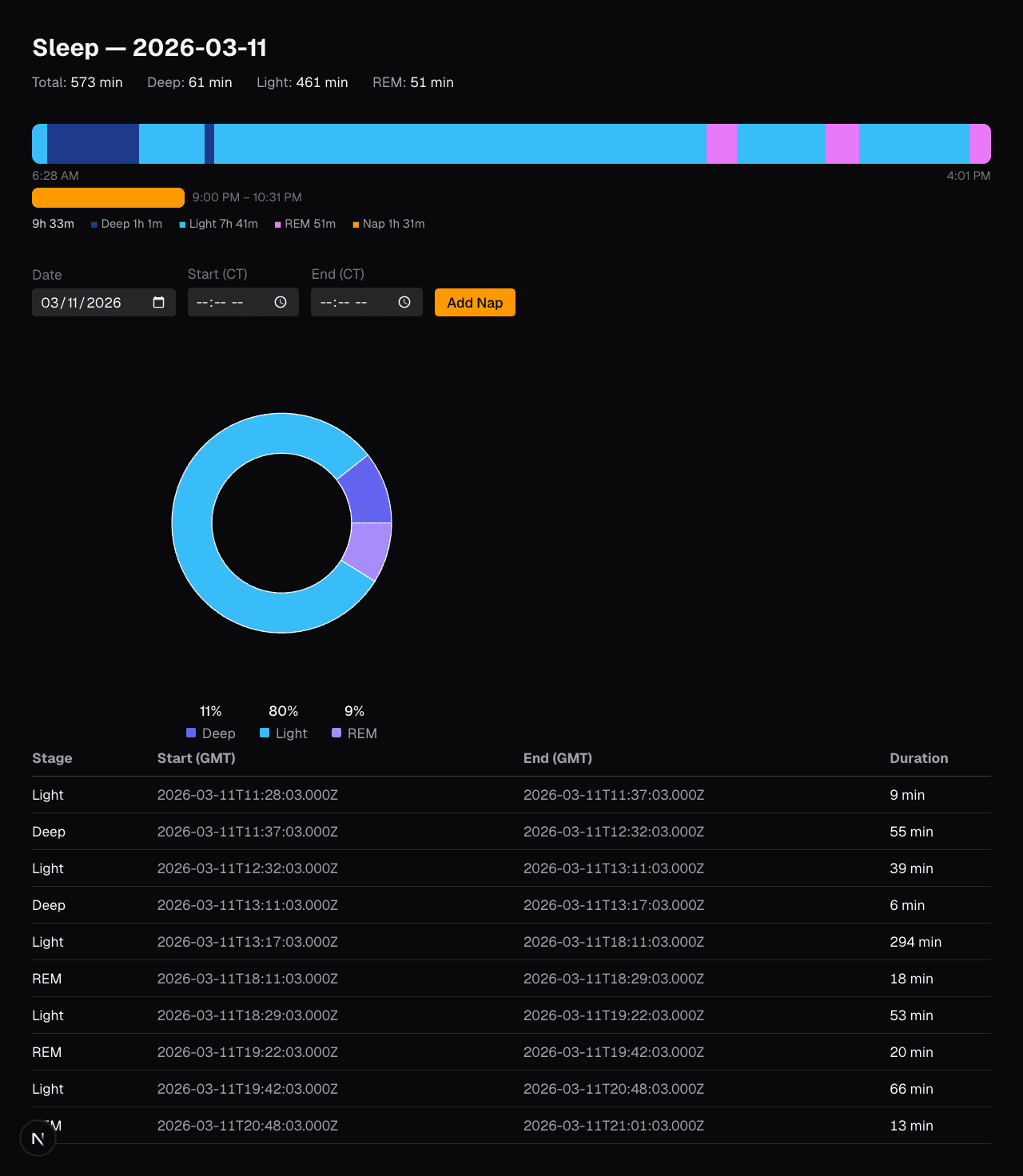 WIP dashboard as I test new designs
The problem with fitness apps
Fitness apps are optimized for the average user who wants a score and a trend line. That's fine. But if you're trying to actually understand your sleep patterns — why you felt wrecked on Tuesday, whether that nap helped, how much deep sleep you're actually getting — you need to be able to dig in and also fix data when the watch gets it wrong.
Garmin also doesn't capture naps at all. If you sleep for 90 minutes in the afternoon, it either doesn't show up or gets misclassified. I wanted a way to log those manually and have them show up alongside the main sleep data.
How it works
The data pipeline is pretty simple:
-
Fetch from Garmin Connect — a Python script using the
garminconnectlibrary pulls sleep data from the API and saves it as raw JSON. It's incremental — it skips dates already fetched, so you can just run it daily to stay current. -
Import into SQLite — a TypeScript script reads the JSON and loads it into a local
garmin.dbSQLite file. Each sleep stage segment gets its own row:(date, start_gmt, end_gmt, stage). Stages map to:-1Unmeasurable,0Deep,1Light,2REM,3Awake. -
Dashboard reads SQLite directly — the Next.js dashboard uses server components that query SQLite synchronously with
better-sqlite3. No API layer, no ORM, no round trips. The data is local and the reads are instant.
The sleep timeline
The main visualization is a horizontal bar — the full width represents the duration of the sleep session, and each stage is a colored segment sized proportionally. Hover any segment and you get the exact time range and stage name.
The color scheme: deep sleep is dark navy, light sleep is sky blue, REM is fuchsia, awake is red. Unmeasurable periods (watch moved, poor contact) are dark gray.
This is a huge improvement over Garmin's own timeline in one specific way: you can see the proportion of each stage at a glance. When you're looking at multiple nights stacked vertically, patterns in the stage distribution become obvious that you'd never notice in a list of numbers.
Nap tracking
Since Garmin doesn't capture naps, I added a manual entry form. You pick a date, enter start and end times in local time, and it saves to a separate naps table in the same SQLite database. The server action converts the local times to UTC milliseconds to match the format the rest of the data uses.
Naps render as amber bars adjacent to the main sleep bar — above if the nap happened before the main sleep session, below if after.
The stack
- Next.js (App Router) — server components do the SQLite queries directly, client components only where interactivity is needed
- better-sqlite3 — synchronous SQLite, perfect for server components
- Tailwind CSS — dark theme throughout, mobile-first
- recharts — powers the sleep stage pie chart
I deliberately kept the stack minimal. No database abstraction layer, no state management library, no API routes. Server components can read SQLite directly in the render function — that's a surprisingly elegant fit for a personal tool like this where the data is local.
What's next
- Edit and delete individual sleep stage records — for when the watch misclassifies something
- Multi-night comparison — stacked horizontal bars scrolling down the page, one per night, so you can visually scan consistency over weeks
- Activity data — workouts, heart rate trends, HRV
The code is on GitHub. The actual data files are gitignored — if you want to run it yourself you'd need your own Garmin credentials and a local garmin.db.